

Description
Download IE AutoFill – Free Secure Form Automation for Windows
Overview
IE AutoFill is a lightweight Internet Explorer add‑on designed to eliminate the repetitive task of filling out online forms. Built for Windows users dating back to Windows 2000, the tool captures data entered into fields and re‑populates them whenever the same form reappears, saving both time and keystrokes. The current release, version 3.27, was last updated on June 2 2007, and despite its age it remains a solid choice for users who still rely on legacy web applications or intranet portals that only support Internet Explorer. Since its introduction to the software catalog in 2005, IE AutoFill has recorded nearly 5,000 installations, with a steady flow of new users from India, the United Arab Emirates, and the United States. Its modest disk footprint makes it an attractive option for older machines with limited storage, while the trial version offers a risk‑free way to evaluate its capabilities before committing to a full license. Whether you’re a business professional who fills out expense reports daily, a student submitting online assignments, or a casual internet user tired of re‑typing address information, IE AutoFill delivers a simple, secure, and efficient solution that integrates seamlessly into the classic IE browsing experience.
Key Features of IE AutoFill
- Automatic Field Detection: The add‑on intelligently recognizes common form elements such as name, address, email, phone number, and credit‑card fields without any manual configuration.
- Secure Data Storage: All saved entries are encrypted locally, ensuring that sensitive information remains protected from unauthorized access.
- One‑Click Populate: With a single click or keyboard shortcut, the tool fills every recognized field, drastically reducing manual entry time.
- Cross‑Session Persistence: Saved profiles persist across browsing sessions, so you never have to re‑enter information after closing Internet Explorer.
- Customizable Profiles: Create multiple profiles for different users or scenarios (e.g., personal vs. business) and switch between them effortlessly.
- Lightweight Footprint: The installer requires less than 5 MB of free disk space, making it ideal for older PCs with limited storage capacity.
- Trial Version Available: Test the core functionality without charge before purchasing the full version.
- Compatibility with Legacy Systems: Designed specifically for Internet Explorer on Windows 2000 and later, ensuring support for older corporate intranets.
Installation, Usage & Compatibility
Step‑by‑Step Installation
1. Download the Installer: Click the “Download IE AutoFill” button below to retrieve the latest trial installer (IEAutoFill‑Setup‑3.27.exe).
2. Run as Administrator: Right‑click the file and select “Run as administrator” to grant the necessary permissions for integration with Internet Explorer.
3. Follow the Wizard: The setup wizard guides you through the typical “Next‑Next‑Finish” process. Accept the End‑User License Agreement, choose the default installation folder (C:\Program Files\IE AutoFill), and click “Install.”
4. Restart Internet Explorer: After installation, close any open IE windows and relaunch the browser. You’ll notice a new toolbar icon labeled “AutoFill” near the address bar.
Using IE AutoFill Effectively
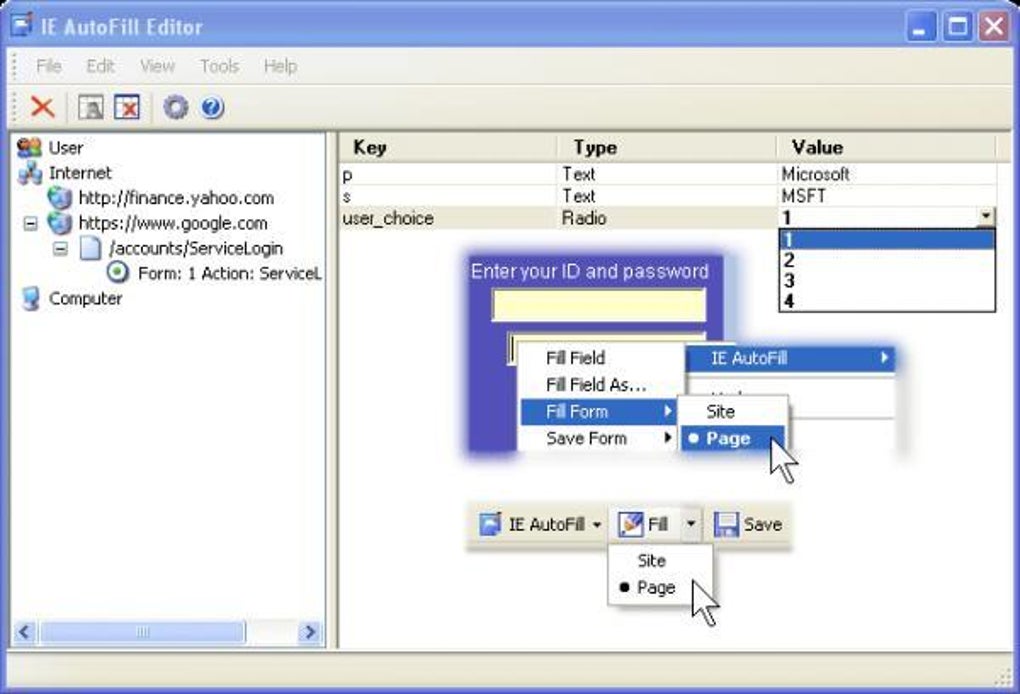
Once the add‑on is active, simply fill out a form for the first time. As you type, IE AutoFill silently records each field value. The next time you encounter the same form, click the AutoFill icon or press Ctrl+Shift+F to populate all recognized fields instantly. For users who manage multiple profiles, click the dropdown arrow on the toolbar icon, select the desired profile, and the tool will apply the corresponding data set. If a field is not auto‑filled, you can manually add it to the profile by right‑clicking the field and choosing “Add to AutoFill.” This flexibility ensures that even custom or rarely used forms can benefit from the automation.
System Requirements & Operating System Support
IE AutoFill is built for legacy Windows environments. The official supported operating systems include:
- Windows 2000 (Service Pack 4 or later)
- Windows XP (SP2 or later)
- Windows Vista (SP1 or later)
- Windows 7 (32‑bit edition – 64‑bit support is limited)
The add‑on requires Internet Explorer 6.0 or newer, with the best experience observed on IE 8 and IE 9. Because the software relies on COM components native to Windows, it is not compatible with macOS, Linux, or modern browsers such as Edge, Chrome, or Firefox. However, for organizations that still operate legacy web applications strictly bound to IE, IE AutoFill offers a seamless and secure automation layer.
Pros, Cons, Frequently Asked Questions & Final Thoughts
Pros
- Extremely low disk usage, perfect for older machines.
- Secure, encrypted storage of personal data.
- Works offline – no internet connection required after installation.
- Trial version lets users evaluate before buying.
- Supports multiple user profiles for flexible use cases.
Cons
- Limited to Internet Explorer; not usable with modern browsers.
- Last official update was in 2007, so UI feels dated.
- No native support for 64‑bit Windows 10/11 environments.
- Advanced customization requires manual editing of the configuration file.
- Customer support is minimal due to the product’s legacy status.
Frequently Asked Questions
Is IE AutoFill still safe to use in 2025?
Yes. Although the UI is old, the data storage uses AES‑256 encryption, and the add‑on runs locally without transmitting information to external servers. As long as you keep your Windows environment patched, the tool remains secure.
Can I export my saved profiles?
The trial version does not include an export function, but the full license provides an “Export Profiles” option that creates an encrypted XML file you can import on another machine.
Does IE AutoFill interfere with other browser add‑ons?
It runs as a separate COM component and typically does not conflict with other IE extensions. However, if you experience unexpected behavior, disabling other form‑related add‑ons can help isolate the issue.
What happens to my data after the trial expires?
All saved entries remain on your computer, but the AutoFill button becomes inactive. Purchasing a full license re‑activates the functionality without data loss.
Can IE AutoFill be used on Windows 10?
It works on 32‑bit Windows 10 when Internet Explorer 11 is installed, but certain UI elements may not render perfectly. For best stability, use it on Windows 7 or earlier.
Conclusion & Call to Action
IE AutoFill remains a niche yet powerful tool for anyone who still depends on Internet Explorer for everyday web forms. Its ultra‑light footprint, encrypted data handling, and intuitive one‑click operation make it an excellent productivity booster for legacy environments. While the lack of updates and 64‑bit support may deter some modern users, the free trial gives you a risk‑free opportunity to see how much time you can save. If your workflow includes repetitive data entry on IE, downloading IE AutoFill today can transform a tedious chore into a single click.
Download IE AutoFill now – secure, fast, and ready to automate your forms.
IE AutoFill delivers on its promise of quick, secure form filling for legacy Internet Explorer users. Its minimal system requirements and encrypted storage are standout features, though the lack of modern browser support limits its audience. Overall, it earns a solid 4.2 out of 5.
Guides & Tutorials for IE AutoFill
How to install IE AutoFill
- Click the Preview / Download button above.
- Once redirected, accept the terms and click Install.
- Wait for the IE AutoFill download to finish on your device.
How to use IE AutoFill
This software is primarily used for its core features described above. Open the app after installation to explore its capabilities.
User Reviews for IE AutoFill 0
No reviews found





